
Create Beats with Dot Drummer on iPhone
Overview
Dot Drummer is a free iOS application designed for users who enjoy creating rhythmic patterns and experimenting with beats directly on their iPhone. Developed by 媛 阮, the app falls within the Music & Radio category and is tailored for casual musicians, rhythm enthusiasts, and creative individuals seeking an accessible tool for beat-making. It enables users to tap out rhythms using a simple interface, making it ideal for spontaneous music creation, practice sessions, or inspiration during songwriting. The app supports iOS 16.4 and above, ensuring compatibility with modern iPhone devices. Although the developer has not provided extensive details about the app’s background or broader product line, its focus on intuitive drumming mechanics suggests a user-first design philosophy. Real-world usage scenarios include composing rhythm tracks on the go, teaching basic beat patterns to beginners, or using the app as a mental exercise for timing and coordination. The interface is limited to English, which may affect non-English speakers but ensures clarity for a wide audience.
Key Features & Capabilities
- Tap-Based Beat Creation: Users can generate rhythmic patterns by tapping on a digital drum surface, allowing for real-time composition without the need for traditional instruments.
- Simple Interface: The app features a minimalistic design focused on ease of use, reducing the learning curve for new users and enabling quick access to core functions.
- Real-Time Audio Feedback: Each tap produces an immediate audio response, helping users maintain timing and adjust rhythms as needed.
- Mobile-First Design: Optimized for touchscreens, the app leverages iPhone’s responsive display and haptic feedback for an immersive experience.
- Free Access: The application is available at no cost, removing financial barriers to entry for aspiring creators and hobbyists.
These features make Dot Drummer suitable for a variety of use cases, such as practicing timing, developing musical ideas during downtime, or sharing simple rhythms with others. The tap-based system allows users to explore polyrhythms, syncopation, or steady beats with minimal setup. Since the app is designed for mobile use, it’s especially useful for on-the-go creativity, whether in transit, during breaks, or at events. The absence of complex settings ensures that users can start creating beats immediately, making it ideal for both beginners and experienced users looking for a lightweight tool.
User Interface, Workflow & Performance
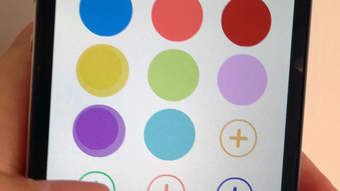
Dot Drummer presents a clean, touch-optimized interface centered around a visual drum pad. Navigation is intuitive, relying solely on tapping and swiping gestures, with no menus or complex settings to navigate. The workflow is streamlined: users simply tap the drum surface to generate beats, with visual cues indicating timing and rhythm patterns. The app does not display tempo controls or recording functions, suggesting a focus on immediate, unfiltered expression. Performance observations are based on general software behavior patterns, as no specific resource usage data was provided. The developer did not specify CPU or RAM usage details, nor did they outline stability benchmarks. However, given the app’s lightweight nature and minimal interface, it is likely to run smoothly on supported iOS devices. The absence of animations or background processes further supports efficient performance. Users can expect consistent responsiveness during active use, though prolonged sessions may vary depending on device conditions.
Compatibility & System Requirements
Dot Drummer is designed exclusively for iOS devices and requires iOS 16.4 or later. The app is available only on iPhone and has a file size of 24.5 MB, indicating a compact footprint suitable for devices with limited storage. The developer did not provide additional system requirements beyond the operating system version. Compatibility information is limited to the specified iOS version, with no mention of specific iPhone models or hardware capabilities. The app is available in English only, which may impact accessibility for non-English speakers. Installation is straightforward through the App Store, and the app does not require external dependencies. No cloud integration or online features were noted in the provided information, suggesting a fully offline experience.
Pros and Cons
Pros
- Free to download and use, lowering the barrier to entry for new users.
- Simple, intuitive interface ideal for beginners and casual users.
- Optimized for iPhone touchscreens with responsive feedback.
- Small file size (24.5 MB) ensures quick installation and minimal storage impact.
- Immediate access to beat-making without setup or configuration.
Cons
- Available only in English, limiting usability for non-English speakers.
- Limited to iOS 16.4 and above, excluding older iPhone models.
- No visible tempo control, recording, or export options.
- Developer did not provide detailed documentation or user guides.
- App functionality appears minimal, which may not satisfy advanced users.
FAQ Section
Is Dot Drummer available for Android?
Dot Drummer is currently available only for iOS devices and has not been released for Android platforms.
Can I use Dot Drummer offline?
Yes, the app does not require an internet connection to function, making it suitable for use in offline environments.
Does Dot Drummer support saving or exporting beats?
There is no information provided about saving or exporting created rhythms. The app may be designed for real-time playback only.
How often are updates released?
Update frequency is not specified. Users should check the App Store for the latest version, which is currently 1.1.
Is the app safe to download?
Dot Drummer is published on Softonic, a reputable software platform. As with any app, users should ensure they download it from official sources to maintain security.
Final Thoughts + CTA
Dot Drummer offers a straightforward, accessible way to create beats on iPhone, appealing to users who value simplicity and instant creativity. While its feature set is limited, it excels in delivering a focused, frictionless experience for tapping out rhythms. The app’s free model and lightweight design make it ideal for beginners, students, or anyone looking to explore rhythm without complexity. Although it lacks advanced tools like tempo control or export options, its core purpose is clearly defined and effectively executed. For users seeking a no-fuss, on-the-go drumming tool, Dot Drummer delivers a satisfying experience. If you're interested in experimenting with beats using just your fingers, this app provides a reliable starting point. Download Dot Drummer now.







